
This feature modifies the AIR record only
Please note: To update an immunisation record, a pharmacist must be selected and you can only update encounters that you submitted via Medadvisor for Pharmacy at the same pharmacy AND the record must be eligible via AIR (Australian Immunisation Record) to be edited.
Please follow these steps:
- In the menu of Medadvisor for Pharmacy select Patients

- Search for the patient and select Record Service

- Under RECENT SERVICES, select the arrow next to the completed immunisation service you would like to amend

Please note: You must include the HPII and HPIO credentials to the pharmacist/authorised immuniser.
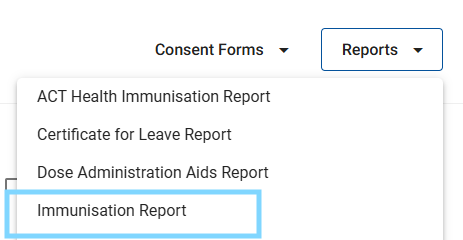
- Alternatively, select the Reports drop down and select Immunisation Report
- Search for the consultation record you would like to alter and select the arrow ->
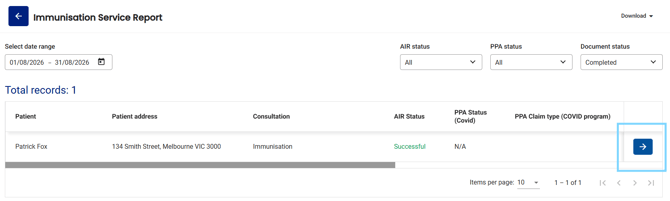
Please note: The Document Status must be Completed
- Scroll down to the completed immunisation form to the Patient vaccination details section and select Update next to the record in the History tab
Please note: If the Update button is not available, you do not have permission to edit the AIR record.
- The Update AIR Record pop-up will appear. Make the required corrections and select Complete
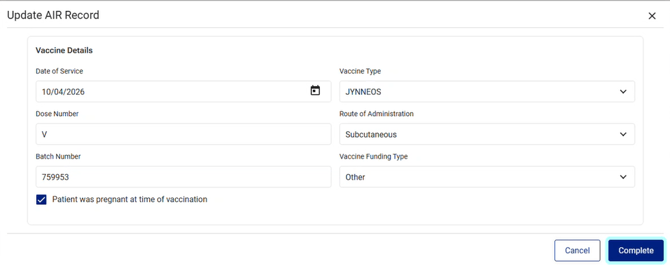
Please note: Only the fields listed above can be edited.
- To confirm the update, select Yes, update

The updates will now be submitted to AIR and updated on the patients' Immunisation history statement which can be printed.
If AIR identifies any errors with the update, these will be displayed in the AIR submission unsuccessful pop-up.
- Select Go back and edit to correct the error
If you cannot update an AIR record via Medadvisor for Pharmacy, please contact AIR directly.