
Use the merge patient services tool to combine duplicate patient accounts from the following sources:
| Account Origin | Description |
| App | Patient signed up to the Medadvisor app (or apps powered by Medadvisor) |
| SMS | Patient signed up to receive SMS reminders and pharmacy communications. |
| Dispense | Patient information has been sourced from your dispense provider |
| Manually added | Patient has been manually entered using Medadvisor for Pharmacy Add Patient option |
| Script Tracker | Patient signed up to Script Tracker. Available in Business Insights |
|
Multiple account origins
|
You may see mutliple account origins for one patient |
Please note: The tool does not merge Medadvisor duplicate app OR duplicate dispense accounts. To resolve app and duplicate dispense account issues, please contact support.
Please follow these steps:
- Select Patients in the menu

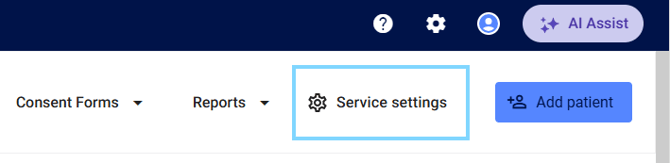
- Select Service settings
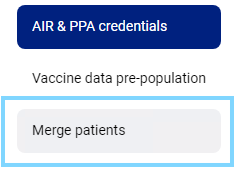
- Select Merge patients
- Under Search & select, enter the patients details that you would like to merge and select Search
Alternatively, search for the patient and select Merge patients on the patient dashboard

Merge patient services tool
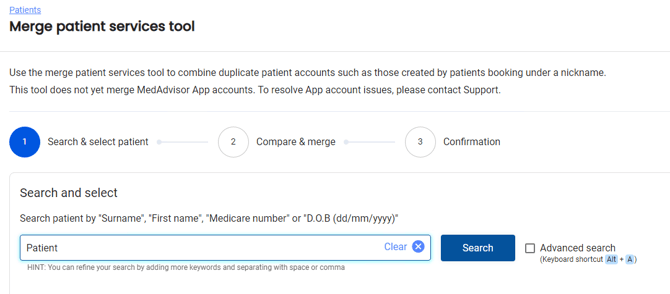
Please note: Select the check box to launch Advanced search options or select Alt + A on your keyboard
- Select the checkbox next to the two patient accounts you would like to merge and select Next
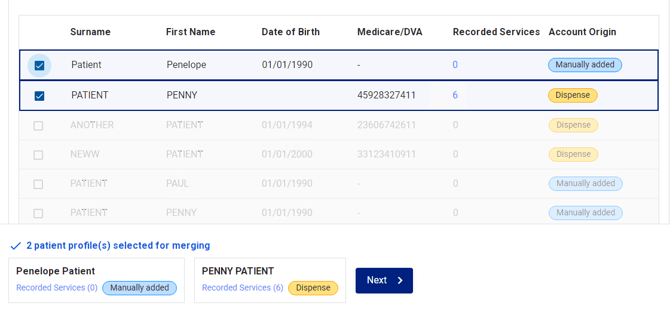
Please note: You can view where the patient information has come from under the Account Origin heading e.g Dispense OR Manually added for a patient added from a booking.
Merging primary patient to keep
- When comparing and merging patients, you will see the Primary patient profile to keep and the Patient profile to merge. You may have the option to switch details

Locked details cannot be merged or overwritten as dispense must be the primary patient profile to keep. We recommend to update all details in dispense.
- When conflicts are detected, you will be alerted showing which information will be deleted once the profile are merged
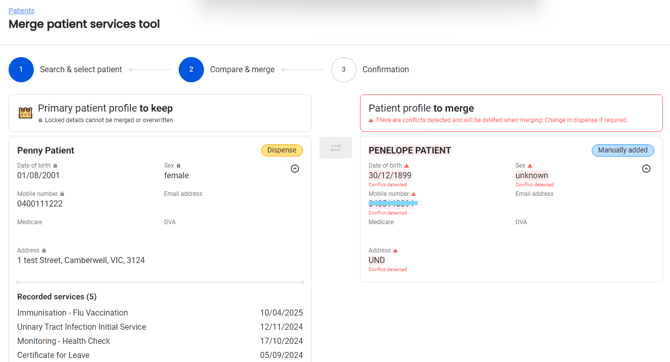
- Compare and swap details as required and select Merge patient profiles
