
IMPORTANT: Before sending script requests you must set up your Doctors - Manage Prescribers. CLICK HERE for more.
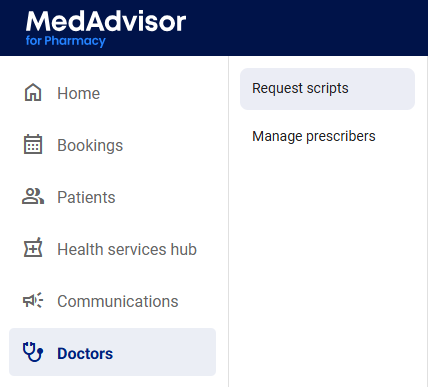
- Select Doctors in the menu and select Request scripts in the sub-menu
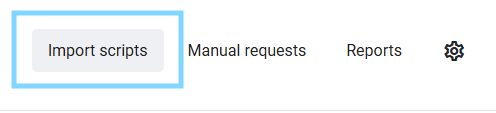
- Select Import Scripts
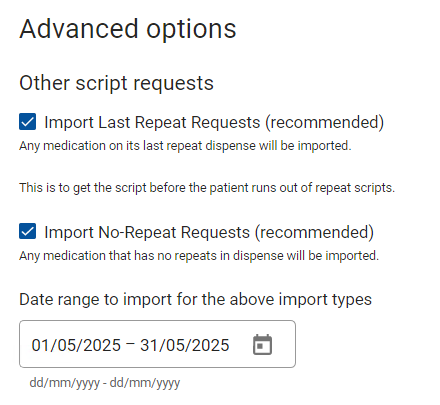
The settings for importing are preset. Make sure the correct sections are ticked, as well as all your prescribers/doctors and facilities that you want to import for, including the recommended setting Owing scripts request (recommended) - Import medications marked as an 'Owing Script' in dispense and other recommended Advanced options.
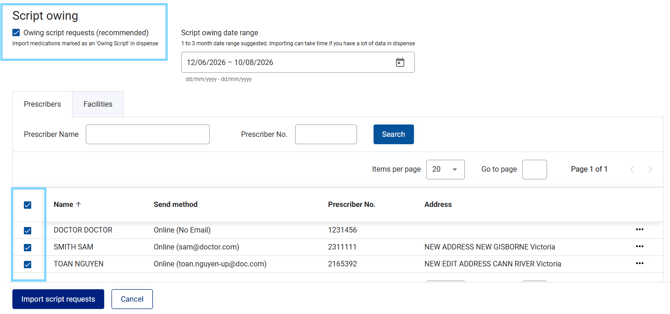
Please note: If the facility or prescriber/doctor is not ticked, the scripts will not import.
- Select the date range for owing script imports
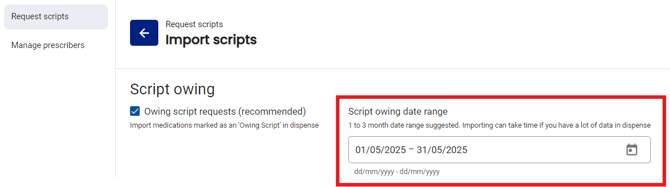
- Select the date range for select last repeat, no repeat and/or pending script imports (optional)
- Select Import Script Requests at the bottom of the screen
Script Requests will import, which can take some time for large volumes, so please wait for loading to complete before exiting, refreshing or restarting the program. For large imports we recommend importing overnight.
- Once scripts are imported you will be able to view them

- Once you are satisfied with your script list you can either click Send All at the top of the screen OR select the scripts you would like to send and click Send Selected

- A display screen will then appear, and you will need to click Yes. These will then send to the prescribers in the form you previously set up (fax or online request) when you imported your prescribers.

Once sent, the prescriber/doctor will get either a fax summary of the requests OR an email to log into their web portal - GP Connect - to print, sign and send the scripts back to the pharmacy so you can reconcile them. In the GP Connect portal, doctors have the option of printing a summary OR generating a preformatted prescription to print on their prescription paper.