
Please follow these steps:
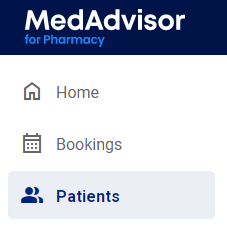
- In the menu, select Patients
-
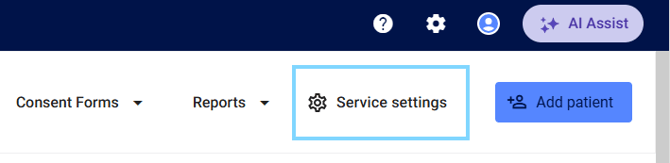
Select Service Settings
-
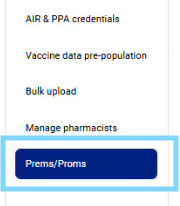
Select PREMs/PROMs in the sub-menu
PREMs / PROMs feature by service form
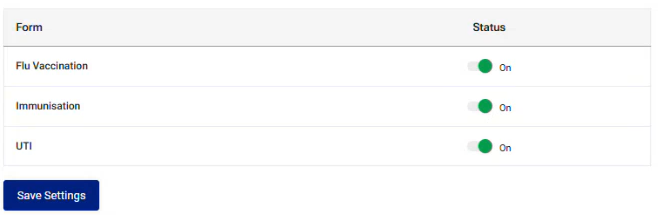
PREMs and PROMs survey questions are turned on by default for the following service forms:
- Flu Vaccination
- Immunisation
- UTI
Please note: Participation in collection of patient PREMs /PROMs is recommended for Quality and Safety Pharmacy Program (QSPP) accreditation and pharmacy quality and safety.
- If not required, toggle off to hide the Consent to PREM/PROM section in the applicable form
- When changes are made, select Save Settings

Data sharing permissions
PREMs / PROMs data can be shared with your Head office (where applicable) and with the QSPP. To share this data, ensure the toggles status are set to ON
Please note: The data sharing permissions are turned OFF by default
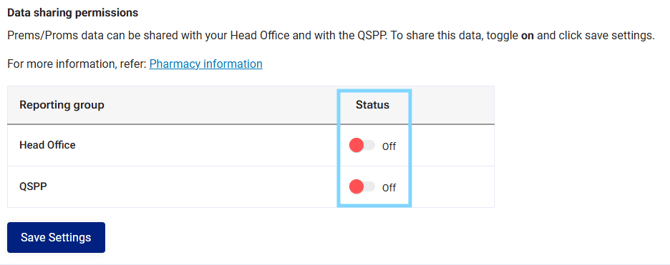
- When changes are made, select Save Settings